
App embeds are elements provided by apps that either float, overlay, or add code to your online store without being visible to customers. They can include chat bubbles, analytics, tracking apps, and more. You can activate, deactivate, and customize app embeds through the theme editor, and they work with any theme version.
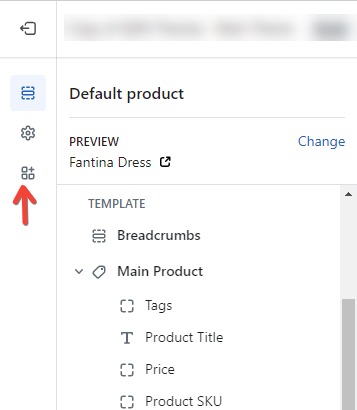
After accessing the theme you want to customize, click on the “App embeds” icon located on the sidebar.
Select the app embed that you want to activate or click the Search bar and enter a search term to search through your installed apps.
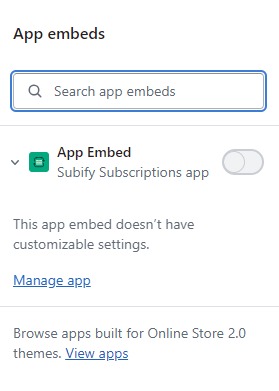
Besides the app embed that you want to activate, click the toggle to activate it.
Optional: View the settings for the app embed by clicking the expand icon ▸ next to the app embed name.
Preview your store to view the embedded app live.
Some apps add functionality to your theme by injecting code directly into your theme’s code. After installation, you may receive instructions to edit your own code to integrate the app’s functionality where desired. Alternatively, you can customize the app using app settings or the theme editor. If your theme includes a Custom Liquid section, you might add the app code there instead of directly editing your theme’s code.